Bug of Screen Tear

@grazer
Noticed a major bug that is happening for seemingly no reason at all my game: Roll n' Bounce! (Pc Port) - Flowlab Game Creator

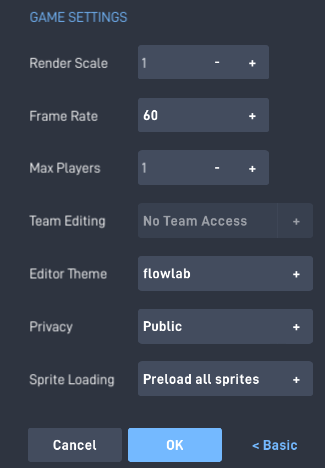
Has lag and screen tear. Where I believe this is a flowlab back-end kind of bug is that if you just create a new blank level in the project. When moving you get screen tear! In browser mode there is lag but if you have exported the project the screen tear is absolutely there if you enter full screen mode. I have tried tinkering with every setting flowlab allows but to no luck. The screen tear still occurs on Steam Deck, Very high-end Pc’s and Chromebooks.

GSync is still active on a high-end PC for the game but the tear is still present
image

I have tried everything from removing ‘always’ blocks, unimportant ‘global’ blocks and animation cutting and whatnot. Those changes have helped the lag a lot but screen tear is still visible.

The screen tear is not there when using the editor. (I exported the game as windows complete)
I took a look. It seems fine. Wait did i do this wrong?

1 Like

That’s interesting, If you or anyone wants further testing.

Would anyone rather a video or a early access steam key to see the tearing?

What device have you used? On my end it currently doesn’t work

Well. It’s I used a huawei or smth. Its a laptop

1 Like

Ok, I think this narrows it down to a export issue…

If you or anyone else wants to test, here is google drive link of the files. Just click the link then double click ‘RollNBouncePcPort.exe’

https://drive.google.com/drive/folders/1c1DQAanBVXMvBzU8dhKOvbKc_LqB1jV5?usp=sharing

V-sync

1 Like

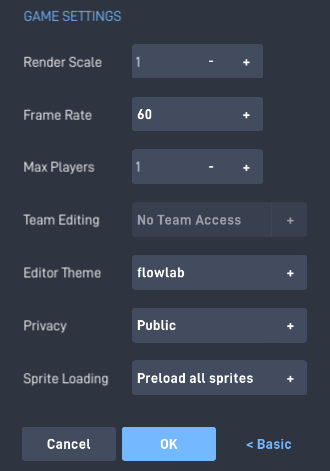
The project has these settings so far, the game will be on steam, but are there any ways to force v-sync?

The current settings
(selecting any other frame rate option made it much worse)

image

Level physics and there should be one that influences fps and set that to ehat they want their fps to be with a setting

2 Likes