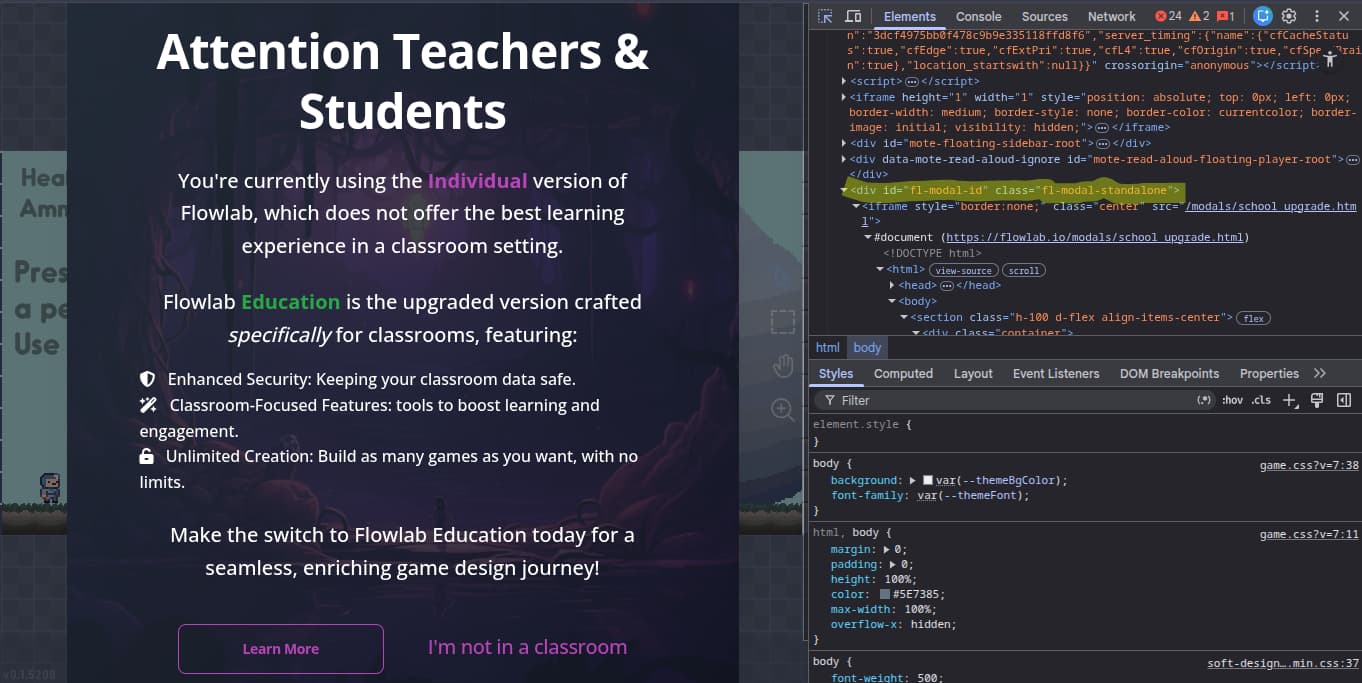
I’ve seen a lot of people ask about this, and I’m not sure if this solution has been posted yet, but it really works! Once the alert pops up, hit “ctrl-shift-c” on the keyboard, a menu will pop up on the side with code. Scroll through the code until you find something with the words “modal-id standalone.” Click that, then right click it and click “delete.” You’ll have to do it every time you reload, open it again, or import a file for editing a sprite, but you won’t get the message anymore for that session.
When dose it pop up, every time you load in to the editor? Or whenever.
1 Like
I was leaving my account having school email, and it pops up like 30s or even 10s per Pop up, so I would say to either use your own email or join a class that have Flowlab as one of the program in your school, it should remove it entirely without get in and delete that line of code.
1 Like
Well if you’ve already removed the popup for the current session, it won’t pop up if you go from the playing area to the editor area and vice versa. However, yes, it will come back if you reload it
1 Like
Thats not too bad is it??
1 Like
Yeah i’m probably going to move the game to my own personal email after i’m done, if that’s even possible.
No it’s not too bad. It’s better than having it pop up every 30 seconds haha
1 Like
It’s possible. You need to go to Profile > Setting > Email Address and change it, then hit Save Changes. It should change after a while.
1 Like
Oh and it saves your games completely?
Your game is still fine even if you change your email address, just don’t do anything different like what I told you, or you may accidentally hit delete account in Billing in Setting.
2 Likes
Ohh ok. Thank you so much!
I can’t find it is it still there?
Oh, you should be at flowlab.io/games/mine then click your profile at the top right to see it and do like what I said.
1 Like
Ohh I get it now, I was trying to look at my profile on this forum. Thanks!
1 Like