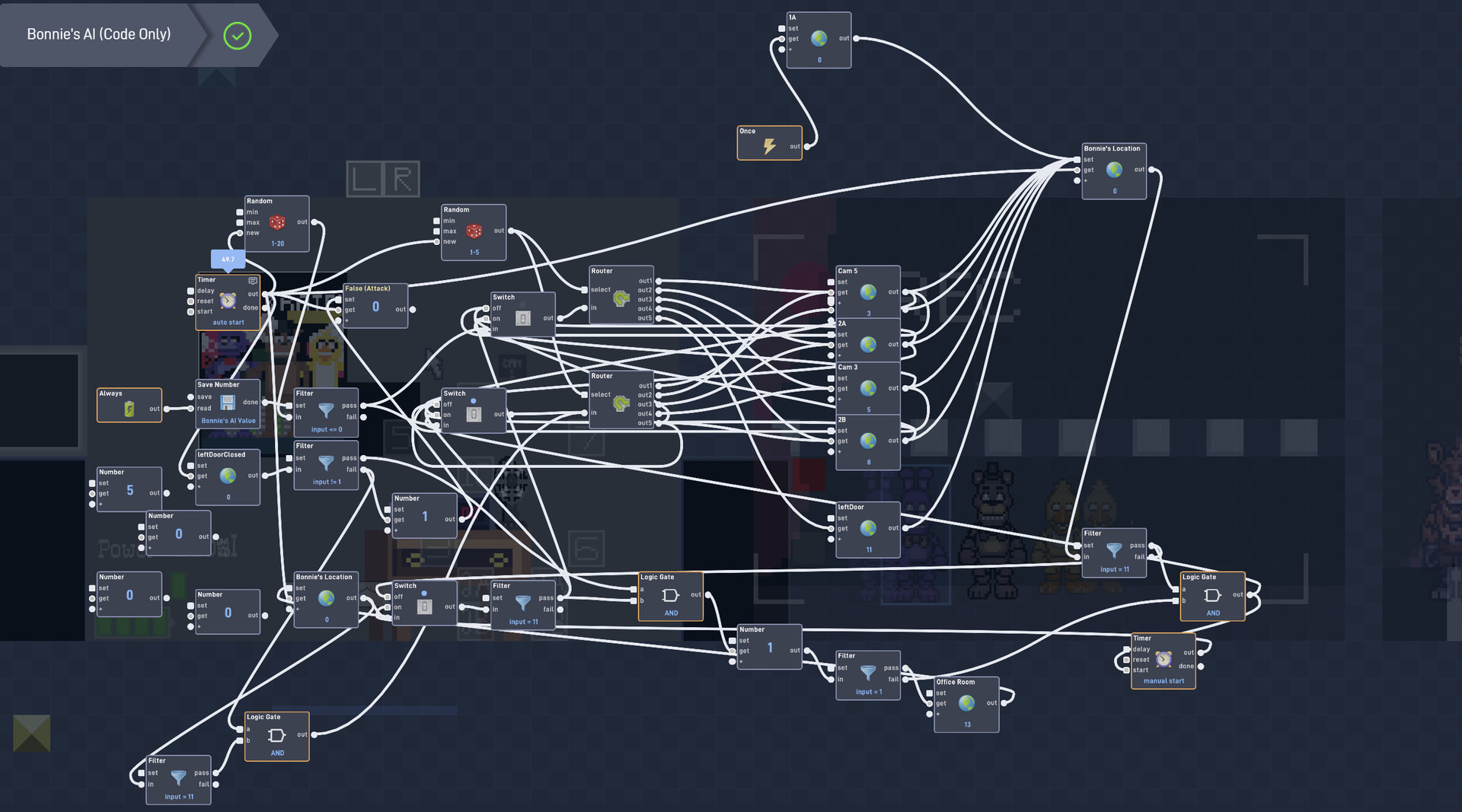
im so sorry for @ing you for something like this but I troubleshooted this a month ago and it worked. Now it isnt working again and i cant figure out why. basically, the code is supposed to make it so the location cant equal 13 until its 11 first. Once the location is 11, it checks for a few factors before deciding if it becomes 13, or goes back to a different location. again. this same exact code worked a month ago so idk what changed but it doesnt work now. if you cant tell what’s going on in this image (which let’s be honest, you prob cant due to my messy code lol), the game link is Five Nights at Freddy's 1 Remake (In Development) - Flowlab Game Creator and the code for each AI is in the animatronic brain for each one. just search the word “brain” in the object library and itll come up with each ai code thing.
Please Note that when “location” is mentioned, it doesn’t mean the traditional flowlab grid location. we have a camera ui system and “location” refers to where someone may be on that. I have how that system will operate down well. its just the 11 → 13 thing im stuck on.
AmazingWaddleDee on an alt here. Im going to leave helpful guides for exactly what each brain is supposed to do in notes in the code for when u see this to help you understand what is supposed to happen. One thing I will note here though is that the camera values are static. They will never change in game despite them being global variables. The game link is attached above. I will leave helpful notes for u in the game in the code for each brain.
Oh and i forgot to mention in general how each AI works.
To make it basic, each AI has a level 1-20. An AI level of 1 makes them move really slow and an AI value of 20 makes them move as fast as they possibly can.
Every X amount of time, each AI will roll a random number 1-20. If the AI level is greater than or equal to the random rolled number, the animtronic will move. As an example, if an AI had an AI level of 5 and the randomly rolled number was 6, the AI would not move. If the AI level was 10 and the randomly rolled number was 8, it would move. If the AI level was 17 and the rolled number was 17, it would move.
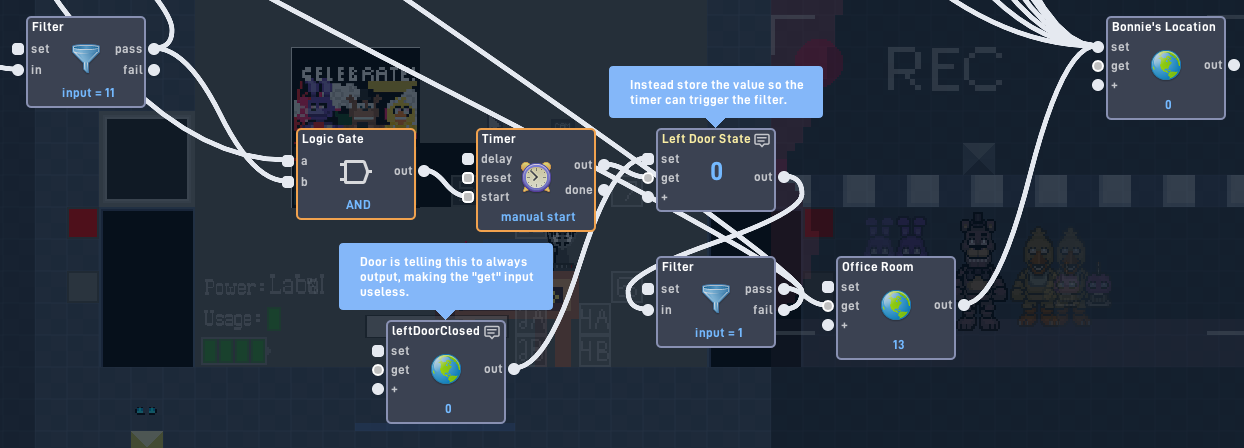
One thing I see is the global in the bottom right that sets the location to 13 is always outputting. These means the left door global is telling all globals to output, making the AND gate and timer useless. You either need to uncheck the “update activate all globals” from the left door OR use a number value that will store the value so the timer can run a check like I’m showing below.
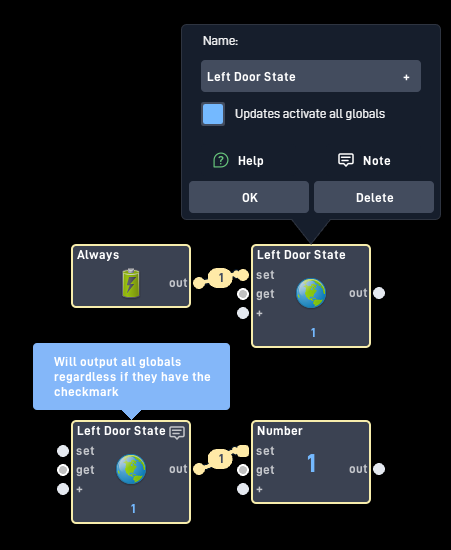
Globals are similar to save blocks, except the data is reset when you reload. Additionally, globals have the ability to make other globals with the same name to output all at once, given the global that was updated has the checkmark on. Checkmarks are set per global, not per name, so you can update (set) the global value of the same name with or without triggering all the globals. Be careful and mindful with globals you will have outputting on their own because a different global with the same name has that check turned on.
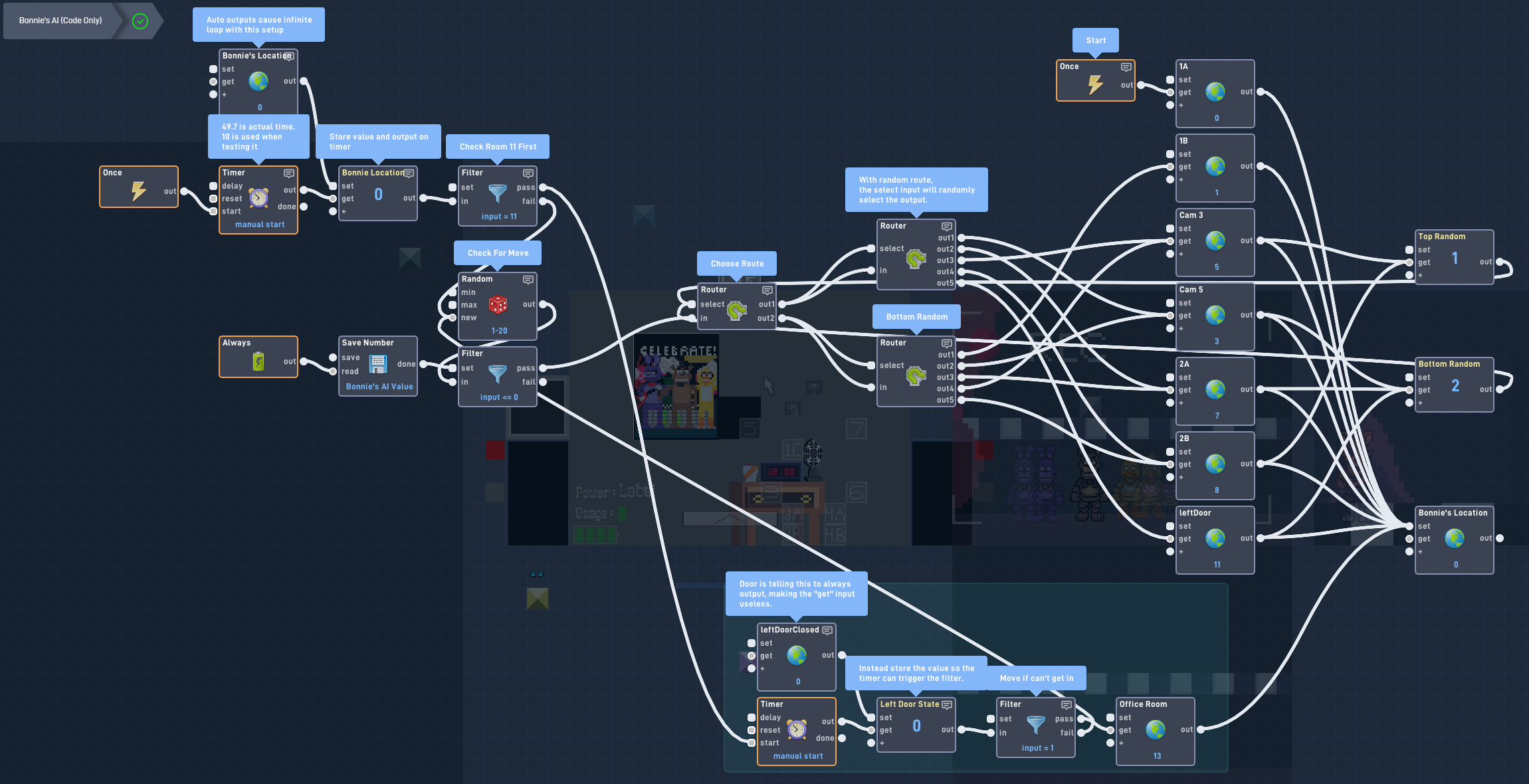
On a separate note, the switches that tells the AI what rooms to go to can be both on at the same time, so the location is updated twice at once. Instead, I recommend using an additional router so the AI is moving to a single room at a time. Also the check to enter the office should be done before the move, so you can tell the AI to move if it can’t enter the office instead of staying in room 11. Additionally, with the router set to random, the random route is set whenever the select input is used.
Here is some of my suggestion and clean up I did altogether, but keep in mind it may not be what you are expecting or wanted, but I do recommend leaning towards this direction for testing and troubleshooting.
that is a lot cleaner. Some thing I will say though:
About the switches, that was my main point of focus at one point. I noticed that both were activating at once sometimes but I couldnt figure out why due to messy code. I tried to make that not possible by adding a switch that, when Bonnie reaches room ID 11, it turns on and is always disabling the other 2, with it then turning one back on if he fails, but that didnt work bc smth kept turning them both back on no matter what I did.
As for the always thing, how can the global variables send a signal without it recieving an input. is it due to it being updated by a different instance of that global variable?
I havent even looked at the code closely yet at the time of me typing this, but I can maybe rework the entire system using that as a base and then just changing stuff for it to work better towards what I want it to do (or if its doing what it should, I can use something like that).
wow. again, idk how u did this (i kinda understand now tho actually) but it worked. I had to change one small thing so it fit in with certain client sided specific code preferences (meaning i had to redefine some variables so it would better fit with the current code’s definition of things) but it works exactly as intended now. thanks
i feel like I was going to say something else too but I forgot.
I tried explaning globals in my reply, but essentially any object that has a global with the checkmark “update activate all globals” will make all globals with the same name output at once, even in different objects.