Please keep the forums a bit more serious than that.
So like lwk, I got forum permissions.
I want myself pinged so I can feel special.
Btw if yall our gonna check my location, please don’t buss me up because I put my exact location.
welcome on th_ uhm…you have a familiar name…well welcome to the communityy
1 Like
Anyways we’re doing tip of the day because I can’t find any other [Great] ideas on examples.
Tip(s) of the day:
Do NOT forget to make it, after you let go of the key-bind to stop moving, get 0 X velocity
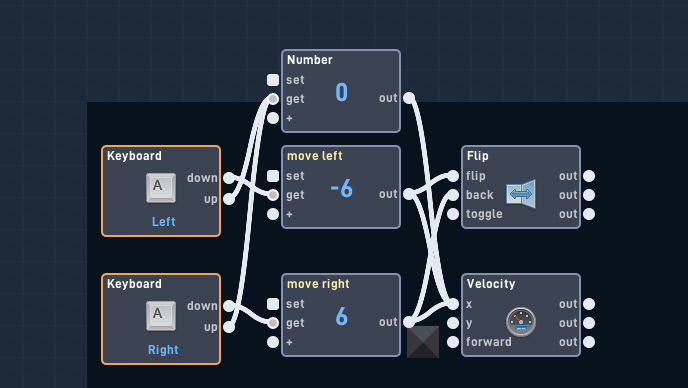
Tip(s) of the day:
If you’re jumping mechanic is collision based, make sure to set it to only bottom: (Note I accidentaly messed up)
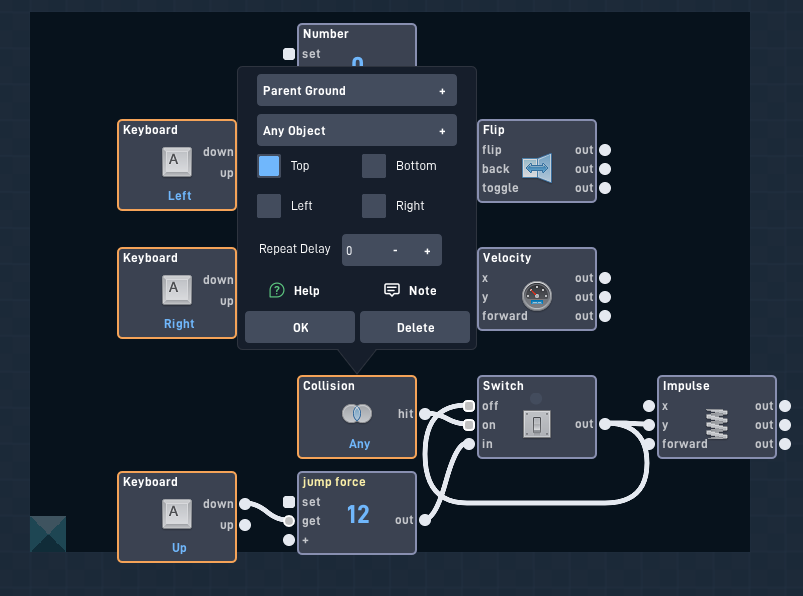
Top? You mean bottom?
2 Likes
Yeah mb lwk
2 Likes
Get this guy out before he copys my bundle too 
1 Like
Tip of the day:
If a input is happening too fast, you can put a timer at 1 millisecond, instead of immediately doing it!
( I can’t do more than 3 posts in a row I’m sorry)
Advanced 3D Example UPDATE.
Advanced 3D example updated, adding new inputs, an output, and a bugfix.
This one focus’s the display.
I almost updated the description of the community bundle.
This is the update:
Update behaviors in the bundle:
- Added 3 new inputs for the display (EnXSizing, OffXSizing, XSizdiv) Check the display inputs in the description for more information.
- Added helpful notes for the 3 new inputs
- Renamed Size to YSize in the display bundle.
- Added new output: XSize (Check the display outputs in the description. for more information)
- Added bugfix where alpha does not reset to normal after turning off.
Update footnotes in the bundle:
- Added new footnotes to include the summary of the update.
- Added footnotes to the footnotes in the footnotes bundle.
- Updates the update counter from 1.00 > 1.05, instead of it being stuck at 1.00.
Update footnotes:
- This update is footnote based
- Added a button to let you see the visuals of the raycaster in the game: Advanced 3D Example - Flowlab Game Creator
- XSizing should be 100% functional.
- Alpha toggle should be 100% functional now.
Pings:
@topojinn.game @EmanuelRowe
1 Like
cool!
incredible!
useful!
1 Like
Nvm I can’t.
Can you please delete the post?
I found a bundle that said “Run and jump but better fixed” and was like.
(no it works fine…?)
Then realized ITS BUGGEDDD!!!
Run & Jump But Better is updated!
Bug fixes:
- Fixed coyote jump not being reset
- Not being able to jump
Qol: - Made proximity in a more natural position
The game can be found here:
How to make your game 3d in 5 minutes:
Steps on how to do that updated.
The steps on how to set up the 3d engine bundle has updated, these are the new steps:
This is the updated version on how to set up the 3d engine.
- Make 3 objects (The display, the wall, the player)
- Go into the player, and put in the “3D engine(Player)4pack” bundle into it, set up the messages, and the raycast target.
- Go into the wall (the object not being displayed, and is the target) and put in the “Wall Fix/Code” bundle into it. You can delete the optional thing in there if you want to, if you don’t I’ll get how to set that up as well too.
- Go into the display, (The object that displays what is happening), and put in the “WallSize(3D)” Bundle into it.
- Go into the player bundle, and go into the spawner, and set it to the display
- Then exit out the spawner bundle, and go into the MAIN raycaster, and then do DisplayDecider.
- Go to the right of the bundle, you should see a message, make the message be sent to the display
- Customize the player bundle till it is the right numbers, and till it works.
- Go into the display sprite, and make it a vertical strips, make it the right pixels width (the PXRate)
- Go into the display code, and customize it to your liking, and to whatever it works.
- For the optional wall stopper thingy that MrSigns came up with, make another object, and make its hitboxes 35% (or whatever you want it to) bigger than the non displayed wall, than go into the non displayed wall and set the spawner as that.
- You might need a do some other jib-jab to make it work, but this is WAY easier than it looks.
- For another optional thing (which is the equation add-ons). I don’t really know how to explain, so you’ll have to ask for like screenshots for that.
- Lastly, make sure your game height/width matches the display and whatnot.
Pings:
@topojinn.game
@EmanuelRowe
Do you also wanna get pinged for updates?:
- Yes!
- No.
- Stop pinging me! >:(
- I don’t like you. I Just don’t.
0
voters
1 Like
Tip of the day:
If your game lags because of proximity s.
You can make it run better by making it only check when its inview:
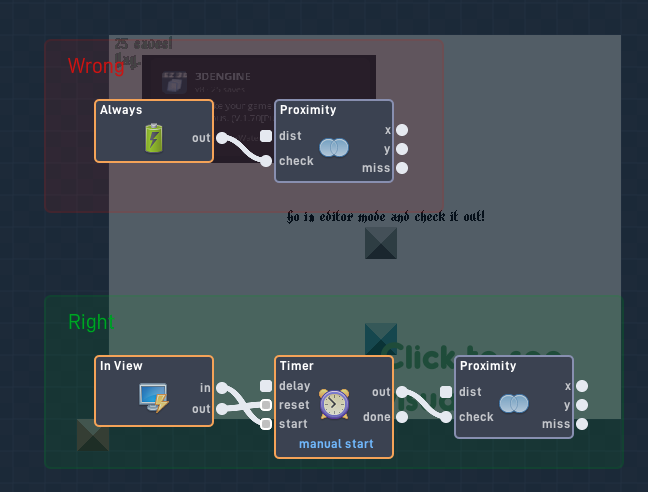
(Ignore the background)
Updated Steps.
This is the updated version on how to set up the 3d engine.
This is from the “3DENGINE” bundle.
- Make 3 objects (The display, the wall, the player)
- Go into the player, and put in the “3D engine(Player)4pack” bundle into it, set up the messages, and the raycast target.
- Go into the wall (the object not being displayed, and is the target) and put in the “Wall Fix/Code” bundle into it. You can delete the optional thing in there if you want to, if you don’t I’ll get how to set that up as well too.
- Go into the display, (The object that displays what is happening), and put in the “WallSize(3D)” Bundle into it.
- Go into the player bundle, and go into the spawner, and set it to the display
- Then exit out the spawner bundle, and go into the MAIN raycaster, and then do DisplayDecider.
- Go to the right of the bundle, you should see a message, make the message be sent to the display
- Then exit out of the display decider and go into the Raycaster, look for all the globals in there, and make them. The helpful notes will tell you what to name them.
- Then go into “BricksEquationButMoreIg” bundle, and go down till you find 2 more globals, make new globals for them, the helpful notes will tell you what to name them.
- Exit out of the player then head to the display, go into the “WallSize(3d)” bundle.
- At the top left should be a global, set it as Rotation Display, DON’T MAKE ONE, SET IT.
- Go into the display sprite, and make it a vertical strips, make it the right pixels width (the PXRate). For example: 2 px rate = 2px width vertical strips.
- Then exit out of the spawner bundle, than to “(MAIN) Raycaster”, then to “Raycast”. There you should see a number labeled as “Starting Raycast Angle”. Usually at 140 (which is mostly correct if you’re using the OOTB set up). But if you done anything different with the bundle, like changing FOV/PxRate/wallCount, you might need to change it.
- Go into the display code, and customize it to your liking, and to whatever it works.
- For the optional wall stopper thingy that MrSigns came up with, make another object, and make its hitboxes 35% (or whatever you want it to) bigger than the non displayed wall, than go into the non displayed wall and set the spawner as that.
- You might need a do some other jib-jab to make it work, but this is WAY easier than it looks.
- For another optional thing (which is the equation add-ons). I don’t really know how to explain, so you’ll have to ask for like screenshots for that.
- Lastly, make sure your game height/width matches the display and whatnot.