They do have different roles, yes. But affected by similar behaviors. I could have just made bundles, but those bundles would literally only be useful in this one game. Every other project I have, they’d just be taking up space in my bundle list.
2 Likes
You could copy and paste your behaviors into other objects.
2 Likes
I… haven’t figured out how to do that. LOL. And I’ve been too afraid to ask, because it’s a dumb question. Just like I haven’t figured out how to resize sprites in the editor. Right clicking on my mouse does not bring up any options. Do I just ctrl+c / ctrl+v when my mouse is hovering over the code? And will it copy everything that code is connected to, or… ?
I’m still very much a newb, and haven’t found many good Flowlab tutorials, so I’ve been doing everything the hard way instead of asking stupid questions on here. Because I know if I ask on here how to copy a behavior, the responses I’ll get will just say “copy and paste it to another object”. Yeah, but how? I know how to save an image from a website (right click, save), I know how to copy/paste text (ctrl+c/ctrl+v), but I have no idea how that works in Flowlab. I might be using the wrong browser.
3 Likes
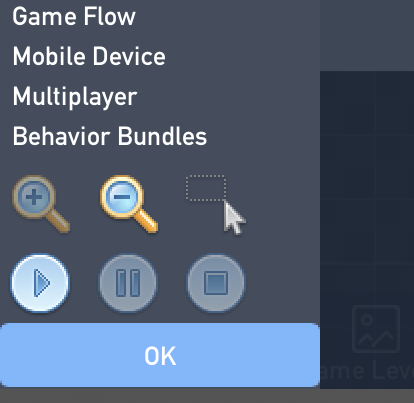
Click the button in the center (cursor and box) and select what you want to copy. Then, an option should appear that says ‘copy’. When you want to paste, click anywhere and another option should appear that says ‘paste’. All of your wires and behaviors will be saved.
As for your sprite editor question:
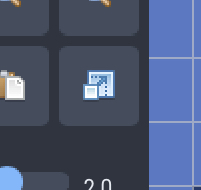
This button should do the trick!
3 Likes
I only know of it from Godot, their whole system is built on parent and children nodes.
Even if objects had different roles, you could have different behavior objects for an object, and make it a parent, do that on and on for each object, then once you have all the main parents make ANOTHER parent, this is just a grandparent, not anything under those objects share the behaviors of the grandparent. If the grandparent has a timer that turns it invisible, all objects will go invisible whether or not the parent object is in the level or not, as long as it’s in your library. I use parent objects for collisions, and messages I need sent to multiple objects. If you wanted to send one message to multiple objects, make a parent object, then send the message TO the parent object. There is no need for code in the parent object, now it’s just there to receive a message. Now go into the objects you wanted to have the message sent to, and use a mailbox with the text in it that was sent to the parent, now any child with the mailbox will receive the message, and you can still do different things with the objects.
I might not make any sense, but if you want to visualize it, think of a family tree. I took this screenshot in Godot, the right side of the screen is the side with parent nodes and children nodes, and a grandparent node.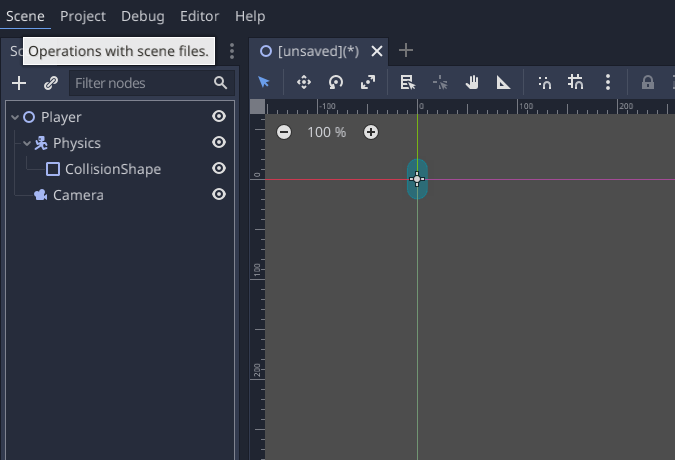
The player node is a parent to the physics node, and the camera node, but is a grandparent to the collision shape, the physics node is also a parent to the collision shape node. The camera has no children.
Hope this helps, somehow @TGW.
1 Like
I HAVE FINALLY RATED EVERY GAME.
Good job to everyone who submitted, these games were a blast to play!
4 Likes
I also just got done reviewing, it was a grind!
Good job to everyone!
These are probably some of the best games ever made on Flowlab!
4 Likes
I rated every game that would load, which was most of them.
2 Likes
I’m almost done reviewing, just finishing up the last few here.
3 Likes
Nice, it kinda sucks that mine is one of the last ones because most people won’t see it.
1 Like
I’ll bet people would scroll down and recognize your name from the featured game and play it. but I get what you mean, is it sorted alphabetically? because it’s not in order of submission. speaking of your game, I finished it, and it was pretty great. I’m looking forward to the new levels coming soon.
2 Likes
Remember it’s only us 30 or so who can review, so I assume everyone will review every game. Don’t worry…
3 Likes
Thanks, I have no idea if it is alphabetically sorted. Maybe it’s last edit.
@Bmarzi Yeah your right.
2 Likes
Patiently waiting until winners get announced so that I can make another FGN article, don’t mind me

(Yeah but seriously tho, all of these games are looking great, can’t wait to see who wins!)
6 Likes
There have been some absolute crackers in this Flowjam, honestly struggling to choose a favourite.
2 Likes
Hey, that’s nice! Thanks! Cool that I can click certain sections of code without having to copy all of it or one at a time. 
As for this one, the only thing I’ve figured out is how to change the size of the sprite’s hitbox. If I draw a small sprite and want to make a larger version of him, dragging that box only seems to make a bigger empty box with a tiny guy in the corner. Like if I have a 1x1 square sprite and I want to make him 2x2, I know how to change the box size, but the sprite doesn’t grow along with it. So I basically have to redraw the sprite at a larger scale. Unless I’m missing something there…
Yes, it does make sense. But the problem with that is, I can’t see or change the code on the new objects? Say the parent is supposed to do X, Y, and Z, at A, B, and C times… the child object is also supposed to do X, Y, and Z, but not at the same time as the parent… I want the same functions but want to change the triggers. Then I have to leave those parts out of the parent functions, right? Or else all of the children will inherit them?
Also doesn’t help that I created the concepts before adding the behaviors, so I would still have to adjust a lot.
2 Likes
I often seem to find myself adding parents after the fact, as the logic is coming together. In the game I was streaming:
- I started with one (mech) enemy type
- I created a new enemy type (creatures), so I then made a Parent object called “Enemy” so that I could deal with enemy targeting and health more easily. The Health and damage logic lives in the Enemy parent type
- I ended up making an additional object type called “Blocker”, for things that block movement. Walls and Enemies are both children of that.
This wasn’t planned, I just added them as needed when I saw that I would have to start duplicating logic otherwise.
2 Likes
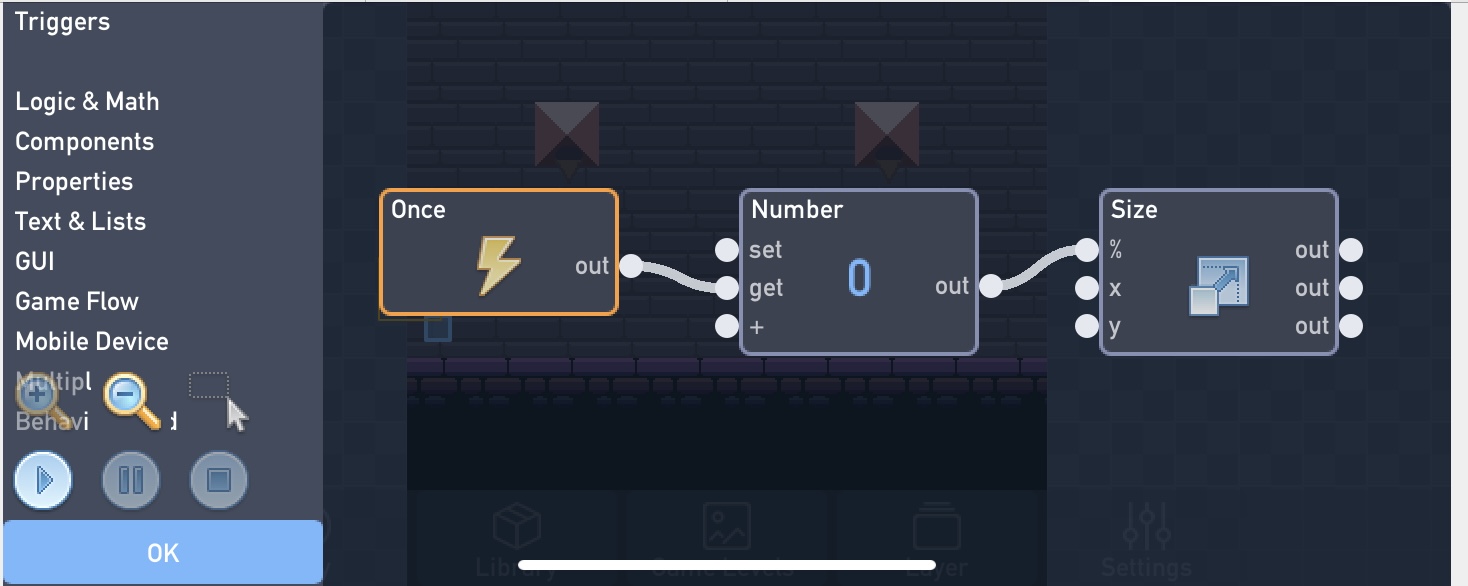
I misunderstood your request. This should solve your problem, but you should set the number to 200 to get twice the original size.
1 Like
Ohhhh so the parent object doesn’t actually have to be usable in the game, just set a block off screen that contains the behaviors you want to copy? That would definitely help. I just didn’t want all of the behaviors of one enemy to copy over to a different enemy.
Yes, that’s what I was looking for. But I was looking in the sprite design screen instead of the behaviors screen.
Thank you both!
1 Like